Video: Contribution Report
The "Contribution Report" is a table of your gifts and offers a number of different options for types of gifts shown and time period displayed.
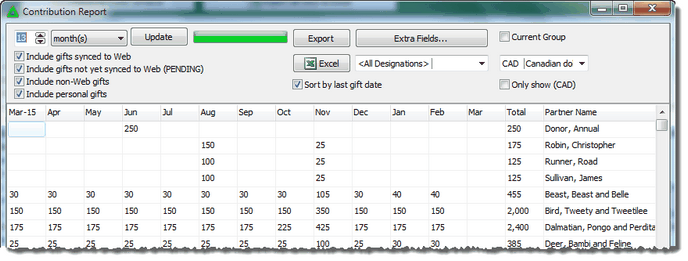
The Contribution Report shows the total giving by donor, per month. It is possible for the total to include multiple donations.
The default display is 13 months, but you can change either the number of months or the time periods displayed (quarterly or annually). Note that you can only go back in time to the present; you cannot select a historical time range, such as 1998-2001.
The Contribution Report offers several helpful filters. (Press "Update" after selecting some filters.)
Include gifts synced to Web
|
Gifts downloaded from your organization.
|
Include gifts not yet synced to Web (PENDING)
|
Gifts you received then forwarded to your organization. This can help you verify that gifts have been correctly recorded by your organization.
|
Include non-Web gifts
|
Gifts you recorded in TntConnect that will not be matched by TntConnect when you sync with your organization. (Generally only used by missionaries whose organizations cannot sync their donations with TntConnect.)
|
Include personal gifts
|
Can be helpful to ensure that you do not exceed your organization’s personal gift limit.
|
Sort by last gift date
|
If you check this box, the donors will be displayed in order of their last gift. This helps you see lapsed donors more quickly (donors who have not given a donation recently). If this box is not checked, the donors will be displayed alphabetically.
|

|
Runs the report again to display the changes you requested.
|

|
Add other Contact fields to your report before exporting.
|
 
|
You can export this report to a file or to Excel.
|
Designation drop down
|
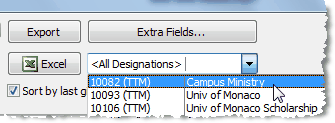
(If TntConnect Pro is turned on in Tools | Options.) You can select one specific designation to view in the Contribution Report. When you select a specific designation, the donors will still be displayed in order of their most recent gift in your database, even if that gift was not given for the displayed designation.
|
Current Group
|

You can filter the Contribution Report to display only the Current Group of contacts that is present when you ran the report.
|
Multi-currency display
|
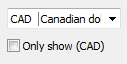
The Contribution Report offers two currency-specific options:
| 1. | You can display all of the gifts converted to the currency displayed in the drop-down list. |
| 2. | You can display only the gifts in the displayed currency. |
|
Tip: Contribution Report
The Contribution Report is good for more than just seeing a chart of your gifts or exporting them to Excel for analysis.
Use the report to ensure that gifts you sent it in have been processed (uncheck gifts that are already synced to web). Or see personal gifts, to see how you are in relation to your organization's personal gift limit.
Read More > Contribution Report