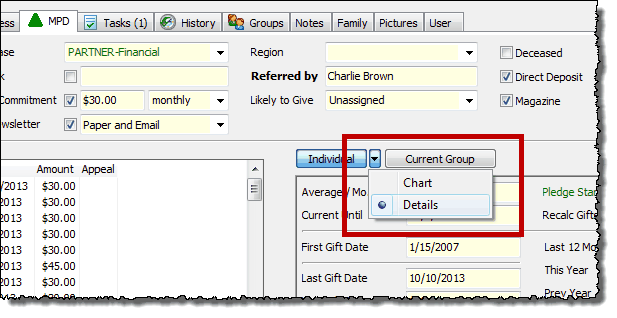
The Contact | View Details displays 26 fields in two sections, Historical (the last time you did one of these things) or Gift Summary (lots of details about their giving, both currently and over time).
Quick tip: You can display the Details box by pressing Ctrl+D and Esc to close.
These screens are now available right in the Contact View. Select the Details button on the TNT Tab or the History Tab. (You must press the small drop-down arrow to select "Details").
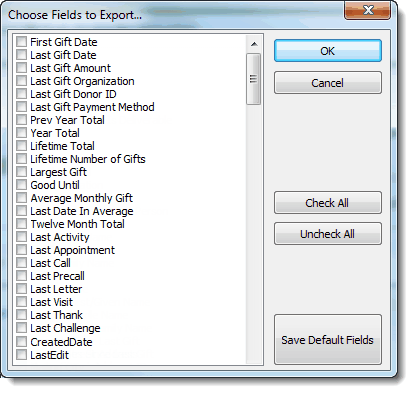
The great thing about these 26 fields is that they are exportable for all contacts. This is great for analyzing your support and deciding where to direct your energies. There are several ways you can export a list that will help you with your support activity (these are just a few examples of the countless things you could do):
| • | Last Thank. Export a list of all your partners, sorted by "Last Thank" to make sure everyone has had a thank you recently. |
| • | Largest Gift/Lifetime Total/Lifetime # Gifts/First Gift Date. Sort by any of these fields to see who the partners who have been with you the longest. |
| • | Current Until is when each partner's next gift is due (based on the pledge amount and recent giving). This date is what feeds the Pledge Fulfillment Report. |
| • | Pledge Start is the most recent date for the current pledge. This may not be when they gave their first gift of the current pledge amount. Note: You can manually change the Pledge Start date to force a different calculation. |
| • | Created Date is the date they were entered as a contact. Because you cannot control the exact date and time they were entered into your database, you may want to adjust this date manually to reflect when they were "created" as a part of your team. |
Exportable Details Fields
These are found at the very bottom of the list of all exportable fields.