Tutorial: Log History
| 1. | On the History Tab, press the Log History button. |


| 2. | Select the task type (such as Call, Letter, etc.) |
| 3. | Select the result (Attempted, Done, and Received). |
| 4. | Select the date and time if different. TntConnect will offer a time for certain time-specific task types (such as Appointment, Call, E-mail, and To Do) but not for others (all types of Letters). |
| 5. | Write a meaningful description—for when you look back months or years later. |
| 6. | If this item is related to a special gift appeal, select the appeal from the Appeal drop-down list on the Details tab. |
| 7. | Assign any of the appropriate details: |
| • | If you are married or work in a team environment, select the User who performed the task. |
| • | Share with Support Coach adds this item to the weekly update (on the Analysis View). |
| • | Define the Purpose. This is a great feature because sometimes a "Call" is actually a "Thank". |
(By default, "Newsletters" are tagged as Mass Mailings. "Thank" and "Present" are marked as Thank.)
While Appointments are not marked as "Partnership Challenge", Appointments have the Partnership Challenge checkbox on the main page in addition to the Details tab.
| • | Assign the Special Gift Appeal. |

Sometimes you want to reply or act on a previous item in your history (for example, completing a phone call when the previous one was only "Attempted"). To do this, right click on any item in the History list and select, "Log Reply".

Tip: View History Details right on the History Tab
You can now view the details of your history with a contact right on the History Tab. These details include Last Call, Last Thank, Last Appointment, etc. Press the little drop-down arrow next to the Individual button. (Naturally, you need to be logging history for the details to display!)
| 1. | Pressing this button... |

| 2. | Displays these details: |

Helpful videos about using the Log History features
Video Series: Track Anything with Log History
Video: Track Pledge Changes using Log History
Video: Manage Prayer Requests using Log History
Video: Log History for "Presents" (non-financial gifts)
Tip: Prepared Message for Answering Machines
In an era of cell phones and busy schedules, it is not uncommon to have difficulty reaching someone by phone. Having a prepared message to leave on their voice mail or answering machine can save you time and frustration, and help you avoid "stumbling" (that is, leaving a confusing message).
Remember when leaving a message to leave it with a smile on your face (they notice). Speak loudly, warmly, and with encouragement.
A prepared message could include one or more of the following items:
| • | A mention that you are praying for them |
Tip: Log Group History
You can log history for a group of contacts at the same time (such as sending a monthly newsletter or an appeal) instead of logging history one contact at a time.
Read More > Tutorial: Log Group History
Tip: History Tips
| • | Log every task you do, regardless of the result. 10 dials = 10 tasks logged. |
| • | When you send a support-related e-mail, blind copy (BC:) yourself, then copy and paste the whole text into the description of your task. Copy both sides if your message is a response to theirs. |
| • | An event is "Attempted" if the desired result is not achieved, such as: |
| ➢ | The person you wanted to talk to did not answer (busy, no answer, babysitter, child, secretary) |
| ➢ | You went to an appointment but they did not show up |
| ➢ | You sent an e-mail but it was returned with a wrong address |
| • | Save commonly-used descriptions to make your history more consistent and easier to create—the description box auto-fills from your saved list. |
| • | When writing a description, be detailed so you can make sense of your history. |
| • | History isn't perfect. For example, if a contact calls you back and you fulfill the activity you were seeking, you may want to use "Done" instead of "Received" on the task. |
| • | Write casual encounters as an "Unscheduled Visit" (found on the bottom in the "Other" task types). |
| • | Log history for all the contacts in the Current Group. For example, when you send a special ask or your monthly newsletter. |
| • | Be ready in and out of season. Have note cards handy, with stamps. Keep an index card to write down who you sent notes to so you can enter it in TntConnect later. |
| • | When talking on the phone, use a pen and paper to scribble notes, as typing may be distracting to the contact (sounds like an airline reservation system!) |
Tip: Saved Descriptions speeds up entry of commonly used task/history descriptions
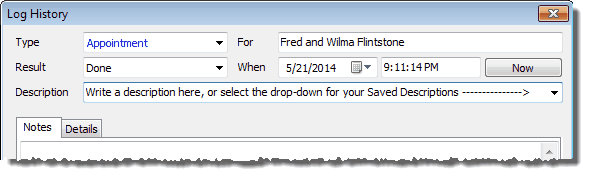
You can save your frequently used descriptions for tasks and history. These autofill as you type them.
| 1. | In the Description box, press the drop-down arrow |
| 2. | Select "Edit List" from the bottom of saved descriptions (if there are any) |
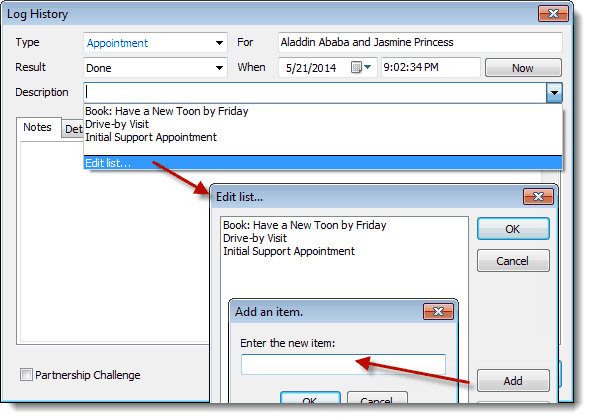
| 3. | Add or Edit your Saved Descriptions |
| 4. | When you want to use a Saved Description, just click in the "Description" box and start typing one of your saved descriptions... TntConnect will auto-fill from your list. (Or, click the drop-down arrow and select the one you want.) |