Quick Links in this topic
Basic lookup concepts
2 Most important things to know about Lookups
The Lookup dialog box
Relationship to the Current Group
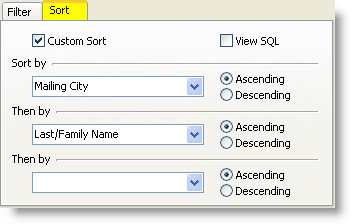
Controlling the Sort Order of a Lookup
What is a Lookup?
Video: Using Lookups
Video: Lookup Donors
When using the database, there will frequently be a need to view one or more contacts who share a common attribute. Here are some examples of contacts who may make up just a portion of the database:
| • | Contacts who are donors (that is, have given a gift of any amount) |
| • | Contacts who attend a certain church |
| • | Contacts who live in a certain city |
| • | Contacts who are also married |
Lookups are useful in preparing reports, editing contacts, creating Saved Groups, mapping, etc.
Lookups always change the displayed list of contacts (that is, the "Current Group"). You can always lookup everyone again by pressing the Lookup Everyone button:
Basic Lookup concepts
Read More > Tutorial: Create a Basic Lookup
| • | When you perform any lookup, the resulting list of contacts is the Current Group. |
| • | The Current Group is always the result of a lookup. |
| • | Lookups by nature are immediate. When a lookup is performed, it returns contacts that meet that criteria at that moment. A lookup on gifts received would be different one month than it would be the next month. |
| • | A Successive Lookup is one where you do a lookup (such as all contacts in a city), then do a lookup within that lookup (such as only the donors in that city). See the table below on Relationship to the Current Group to see the four ways you can control the returned list of contacts. |
| • | Default Lookup upon opening TntConnect. When the database is opened, a lookup is performed immediately. The default lookup is , and the Current Group then is all contacts in database. (You can change your Default Lookup in . |
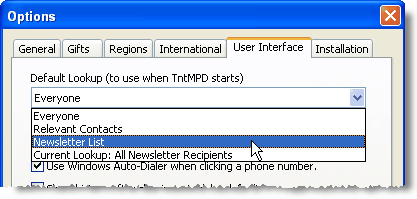
Everyone
|
All contacts in the database.
|
Relevant Contacts
|
Decision is not No. Includes anyone whose TNT Phase is anything but <Not Interested> or <Never Ask>), anyone who is a newsletter recipient, and the <Me> contact.
|
Newsletter List
|
All newsletter recipients and the <Me> contact.
|
Current Lookup
|
Whatever the Current Lookup is at the moment this menu item is chosen can be saved as the default lookup. You can create your own favorite lookup, then have TntConnect run that lookup every time you open TntConnect.
|
The 2 Most Important Things To Know
| 1. | Doing lookups cannot harm your database. Use trial and error to learn about them. |
| 2. | Lookups answer "Who" questions |
| • | Who should I call for a decision right now? |
| • | Who should I call to make an appointment with? |
| • | Who should I call when I go to Vancouver next week? |
| • | With whom do I have an appointment scheduled? |
Lookups do not answer "How much" questions
| • | How much monthly support do I have? |
| • | How much have support have I received this year? |
As a new staff member, your list of Who? questions would be fairly straightforward. But for senior staff, the number of possible combinations could literally be in the millions. For example:
| • | Who supported our ministry between 1999 and 2001 and not since and gave more than $3000 but never more than $500 in a single gift and is married? |
Lookups Dialog Box
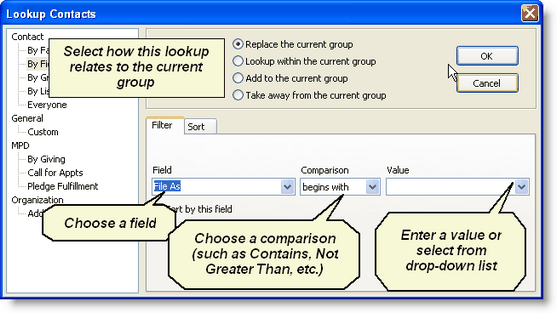
Some lookups run immediately when selected from the menu. But most lookups bring up the Lookup Contacts dialog box so that the lookup criteria can be defined.
Relationship to the Current Group
When performing a lookup, the software needs to know how the results will impact the Current Group.
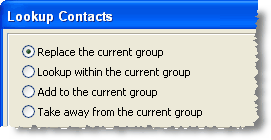
Replace the current group
|
Queries the entire database and displays a new group. Or, "Ignore the current group, and out of all contacts in my database, only show me those who meet 'this' criteria.
|
Lookup within the current group
|
Queries the Current Group and displays only those contacts that meet the criteria from the Current Group. Or, "Using only this current group as a starting point, now show me contacts who meet 'this' criteria."
|
Add to the current group
|
Queries the entire database, but maintains the currently viewed group and combines the two lists. Or, "Keep this same current group, but add only the people who meet 'this' criteria."
|
Take away from the current group
|
Queries the Current Group and removes those contacts that meet the criteria chosen. Or, "Lookup this same group, except, take away contacts that meet 'this' criteria."
|
Sort Order
There are two ways to control the sort of a lookup. Since alphabetical is the most common, you can sort the current group alphabetically just by right-clicking in the list.
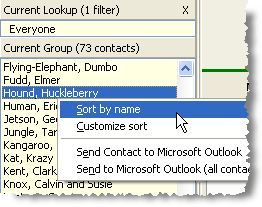
You can customize the sort from there as well, or at any time while creating a Lookup: