The Deceased field is a check-box on the TNT Tab.

When a contact dies
Because your TntConnect database is a history of your support raising activity, you should retain information about contacts even if they are deceased. It is unwise to delete any contact from your database because doing so would eliminate their task history and giving history as well. However, for the purpose of advanced lookups, it may also be helpful to exclude any contact who is deceased.
Read More > Deleting Contacts
When you check the Deceased box, TntConnect performs several steps to makes it very apparent that this contact is deceased. Note: It will not perform these steps until the screen is saved.
These automatic actions related to Deceased include:

| • | Adding "(DECEASED)" next to their name. This only changes the display of the name; it does not change the name itself. |
| • | Update the Greetings with "(DECEASED)" after each greeting. |
| • | Masking their street address, unchecking the "Deliverable" box, and replacing it with "(Street address is hidden.)". The address is still there, but it is hidden. |

| • | Unchecking the box next to any phone numbers and e-mail addresses. This causes the phone number or e-mail address to have a strikethrough (a line across the middle). |
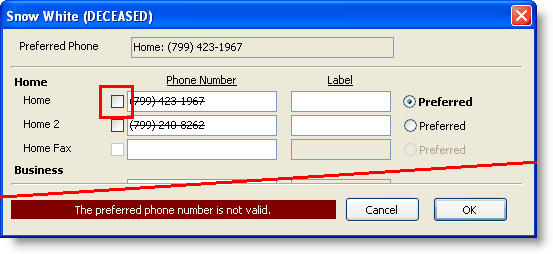
| • | Changing their TNT Phase from whatever it was to "Never Ask", and checking the "Never Ask" box. If their TNT Phase was formerly "PARTNER-Financial", it will not eliminate their pledge amount and frequency. |
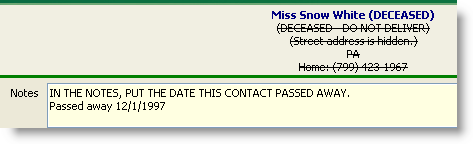
| • | This is not done automatically, but you may want to type a note specifically indicating the date of death. |
Correcting a contact erroneously marked as Deceased
When you check the Deceased box, TntConnect performs the two steps described above (changing TNT Phase and obscuring/eliminating address information). If you inadvertently mark a contact as deceased who is not, you will need to manually undo these steps. Specifically, you need to:
| 1. | Uncheck the "Deceased" box. |
| 2. | Press the <Save> button. |
The only automatic activity that will occur is that TntConnect will restore the Greetings by removing the "(DECEASED)" after each greeting.
| 3. | Change the TNT Phase back to what it was previously |
| 4. | Edit the contact's address(es); TntConnect will typically retain the address but simply hide it. To restore it, check the Deliverable box on the address. |
| 5. | Edit the phone numbers and e-mail addresses by re-checking the valid box that was unchecked by TntConnect. |
Deceased Spouse
TntConnect does not have a way to track the name of a now-deceased spouse. You may want to keep the name of a deceased spouse for future reference. In some cases, an older woman will continue to use her husband's first name even though he is deceased.
Look on the Family Tab and update any birthdays and anniversaries. For example, if you move the Wife to be the Primary contact (when the husband dies), be sure that the Primary birthday on the Family tab is also the wife's. You may want to either delete the deceased spouse's birthday and the anniversary, or move them to the Notes tab.
Most of the time, the best course of action is to remove the deceased spouse's name from the address. If you want to keep the spouse's name, type it in the Notes.
Case study of deceased spouse
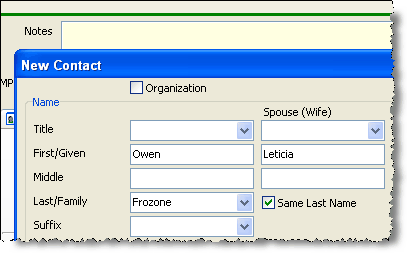
| 1. | When both spouses are alive, the husband's name is on the left, while the spouse's name is in the Spouse column. |
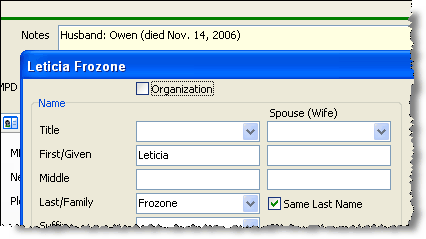
| 2. | After the death of the first spouse, put that person's name and date of death in the notes box. Put the surviving spouse's name in the First/Given (primary) box. |
| 3. | After the death of the surviving spouse, for your permanent records put the names back as you originally had them (husband as primary first/given name, wife in spouse column). Then check the "Deceased" checkbox. |
