TntMPD
Powerful software for ministry partner development...
Exploding TntMPD 2.0 » Introduction » Shortcuts
Shortcuts

Contents

Introduction
TntMPD Overview
TntMPD History
Shortcuts
TntMPD Views
Quick Reference Guides
Reference Guide: TntMPD Overview
Reference Guide: Managing Contacts
Reference Guide: The MPD Tab
Reference Guide: Tasks & History
Reference Guide: Using Lookups
Reference Guide: Using Appeals
Reference Guide: Using Mail Merge
Reference Guide: Import Contacts
Reference Guide: Using Groups
Getting Started
About Printing
Installing TntMPD
Login/Password Error
Tutorial: Creating a new TntMPD database
Setting TntMPD Options
Tutorial: Set Your TntMPD Options
General Tab
Gifts Tab
Regions Tab
International Tab
User Interface Tab
Installation Tab
Managing Contacts Overview
Tutorial: Contact View Overview
Tutorial: Adding/Editing a Contact
Matching Contacts
Exporting Contact Information
Summary Data
Address Tab
Greetings
Phone Numbers
Email/Internet Addresses
MPD Tab
Tutorial: MPD Tab Overview
MPD Phase
Next Ask
Pledge
Region
Referred by
Likely to Give
Send Newsletter
Deceased Contacts
Direct Deposit
Magazine
Tasks/History Tabs (Contact View)
Groups Tab (Contact View)
Notes Tab
Personal Tab
Pictures Tab
User Tab
Other Contact/Group Menu Items
Add Referrals
View Organization Info
Address / Phone Out of Sync
Manually Add Donor IDs
Combining multiple accounts for one contact
View Details
Send Email to your Contact(s)
Deleting Contacts
Importing Contacts
Address Input from Web
Gifts & Appeals
Tutorial: Downloading Gifts from the Web
Giving History
Tutorial: Adding New Gifts
Gift Input Form (manual input)
Address and Gift Input from File
Dealing with Gifts
Editing Gifts
Deleting Gifts
Splitting Church/Foundation Gifts
Appeal Tracking
Tutorial: Creating Appeals
Associate History with an Appeal
Tutorial: Log gifts from an Appeal
Review Appeal results
View Giving Trends Report
Lookups Overview
Tutorial: Create a Basic Lookup
Lookup Dialog Box
Successive Lookups
Lookups Sort Order
Lookup Menu Items
Lookup Favorites
Default Lookup
MPD Lookups
Groups / Saved Groups
Current vs. Saved Groups
Tutorial: Setting up a new Saved Group
Current Group
Tutorial: Change a Field (for all Contacts in the Current Group)
Tutorial: Log History (for all Contacts in the Current Group)
View Giving History
Send Group Email
Tasks & History
Task Types
Tutorial: Schedule a Task
Tutorial: Log History
Automatic Action for New Gifts
Clearing or Exporting Tasks
Writing Meaningful Descriptions
Saved Descriptions
MPD Phase Auto-change
Analysis & Tools
Analysis View
Support Progress Box
Contacts & Referral Pool
Weekly Activities
Charts
Pledge Fulfillment Report
Contribution Report
Birthday & Anniversary Report
All Pictures
Other TntMPD Tools
Schedule View
Sync with Outlook
Mail Merge
Tutorial: Mail Merge
Tutorial: Mail Merge-Labels
Tutorial: Email Merge
Mail Merge Favorites
Practical Merge Tips
TntSync
Tutorial: Synchronize two TntMPD Databases
Tutorial: Synchronizing Files & Folders
Backups
Copying your Database
File Maintenance
Compact & Repair Database
Check for Updates on the Web
Exporting from TntMPD
Link with Microsoft Access
Getting Help
Community View
Error Reporting
View System Info
Help | About
Pick Lists
TntMPD Pro
All TntMPD Tips

Syndication

Shortcuts

Print this Topic Previous pageReturn to chapter overviewNext page

TntMPD has no customizable shortcuts.

Shortcut

What it does

Menu path to do this

Ctrl-A

Select All

Menu Path: Edit | Select All

Ctrl-C

Copy

Menu Path: Edit | Copy

Ctrl-L

Log History (for all Contacts in the Current Group)

Menu Path: Group | Log History (for all Contacts in the Current Group)

Ctrl-O

Open (another TntMPD database)

Menu Path: File | Open

Ctrl-R

Add Referrals (in Contact View)

Menu Path: Contact | Add Referrals

Ctrl-S

Save

Menu Path: File | Save

Ctrl-V

Paste

Menu Path: Edit | Paste

Ctrl-X

Cut

Menu Path: Edit | Cut

Ctrl-Z

Undo

Menu Path: Edit | Undo

F1

Context-sensitive Help. Hit F1 from any screen and receive help for that screen.

Menu Path: Help | TntMPD Help

F2

Turn on/off Shortcut bar

Menu Path: View | Shortcut Bar

F3

Turn on/off Contact list (in Contact View)

Menu Path: View | Contact List

F5

Refresh

Menu Path: View | Refresh

F8

See your System Information

Menu Path: Help | View System Info

F12

See address block enlarged (in Contact View)

Menu Path: Contact | View Magnified Address Window

Alt-F4

Exit

Menu Path: File | Exit

Shift-Ctrl- Delete

Delete Contact

Menu Path: Contact | Delete Contact

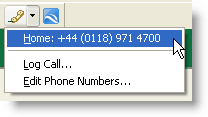
Call Center

Quick access to call activities (log history for a call, or edit phone numbers)

Show Google Map

Automatically launch a Google Map of the selected contact, if available.

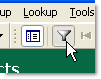
Everyone

Menu Path: Lookup | Everyone

Tip: Mouse tips

Hover your mouse over buttons or clickable fields; many of them have short tips that will pop up for a moment.

Hover over an email address and the arrow will change to a hand. Click on it and you can send an email message.