TntMPD
Powerful software for ministry partner development...
Giving History

Contents

Introduction
TntMPD Overview
TntMPD History
Shortcuts
TntMPD Views
Quick Reference Guides
Reference Guide: TntMPD Overview
Reference Guide: Managing Contacts
Reference Guide: The MPD Tab
Reference Guide: Tasks & History
Reference Guide: Using Lookups
Reference Guide: Using Appeals
Reference Guide: Using Mail Merge
Reference Guide: Import Contacts
Reference Guide: Using Groups
Getting Started
About Printing
Installing TntMPD
Login/Password Error
Tutorial: Creating a new TntMPD database
Setting TntMPD Options
Tutorial: Set Your TntMPD Options
General Tab
Gifts Tab
Regions Tab
International Tab
User Interface Tab
Installation Tab
Managing Contacts Overview
Tutorial: Contact View Overview
Tutorial: Adding/Editing a Contact
Matching Contacts
Exporting Contact Information
Summary Data
Address Tab
Greetings
Phone Numbers
Email/Internet Addresses
MPD Tab
Tutorial: MPD Tab Overview
MPD Phase
Next Ask
Pledge
Region
Referred by
Likely to Give
Send Newsletter
Deceased Contacts
Direct Deposit
Magazine
Tasks/History Tabs (Contact View)
Groups Tab (Contact View)
Notes Tab
Personal Tab
Pictures Tab
User Tab
Other Contact/Group Menu Items
Add Referrals
View Organization Info
Address / Phone Out of Sync
Manually Add Donor IDs
Combining multiple accounts for one contact
View Details
Send Email to your Contact(s)
Deleting Contacts
Importing Contacts
Address Input from Web
Gifts & Appeals
Tutorial: Downloading Gifts from the Web
Giving History
Tutorial: Adding New Gifts
Gift Input Form (manual input)
Address and Gift Input from File
Dealing with Gifts
Editing Gifts
Deleting Gifts
Splitting Church/Foundation Gifts
Appeal Tracking
Tutorial: Creating Appeals
Associate History with an Appeal
Tutorial: Log gifts from an Appeal
Review Appeal results
View Giving Trends Report
Lookups Overview
Tutorial: Create a Basic Lookup
Lookup Dialog Box
Successive Lookups
Lookups Sort Order
Lookup Menu Items
Lookup Favorites
Default Lookup
MPD Lookups
Groups / Saved Groups
Current vs. Saved Groups
Tutorial: Setting up a new Saved Group
Current Group
Tutorial: Change a Field (for all Contacts in the Current Group)
Tutorial: Log History (for all Contacts in the Current Group)
View Giving History
Send Group Email
Tasks & History
Task Types
Tutorial: Schedule a Task
Tutorial: Log History
Automatic Action for New Gifts
Clearing or Exporting Tasks
Writing Meaningful Descriptions
Saved Descriptions
MPD Phase Auto-change
Analysis & Tools
Analysis View
Support Progress Box
Contacts & Referral Pool
Weekly Activities
Charts
Pledge Fulfillment Report
Contribution Report
Birthday & Anniversary Report
All Pictures
Other TntMPD Tools
Schedule View
Sync with Outlook
Mail Merge
Tutorial: Mail Merge
Tutorial: Mail Merge-Labels
Tutorial: Email Merge
Mail Merge Favorites
Practical Merge Tips
TntSync
Tutorial: Synchronize two TntMPD Databases
Tutorial: Synchronizing Files & Folders
Backups
Copying your Database
File Maintenance
Compact & Repair Database
Check for Updates on the Web
Exporting from TntMPD
Link with Microsoft Access
Getting Help
Community View
Error Reporting
View System Info
Help | About
Pick Lists
TntMPD Pro
All TntMPD Tips

Syndication

Giving History

Print this Topic Previous pageReturn to chapter overviewNext page

Understanding a contact's giving records

Being able to see a graphical history of your donors gifts can be both exciting and encouraging.

When you select a contact in the Contact View, and are looking at the MPD Tab, there are two different places where you will see giving information:

1.At the top right of the screen, to the right of their name and address, is the "Summary Data" section to give you a quick overview of the selected contact's giving.
2.The bottom half of the screen shows both a list of all gifts and a graph of giving.

Read More > Summary Data

Giving History

The bottom section is divided into two parts. The box on the left is a list of all giving for this contact.

The box on the right is a graphical representation of their giving for the past 13 months. You can change from viewing this contact to viewing all of the contacts in the Current Group. You can also change the displayed number of months or years.

International Note: How currency is shown

There are two common concerns about currency display in TntMPD:

1.A missionary receives gifts from donors in more than one currency, but they are displayed only as one currency.
2.A missionary receives all or most of their gifts in one currency, but because they are serving in another country, the display shows the currency of the country they are in, not the currency the gifts were given.

The most important principle to understand about the gifts in TntMPD is that they are not in any currency. They are simply numbers, or "units of currency". So if you have a donor who gives US$25 and another who gives 25€ euros, both will appear as 25. It will be up to you to interpret the difference.

If you receive gifts in multiple currencies in your one TntMPD database, the analysis tools can be skewed. For example, if you have one donor who gives US$25 while another gives 100,000 Zimbabwe dollars which may have been worth the same amount on the date of the gift, the 100,000 gift will appear much larger than the 25 gift.
TntMPD does not have currency conversion features. If you want to maintain giving records in two separate currencies, you will need two separate databases.
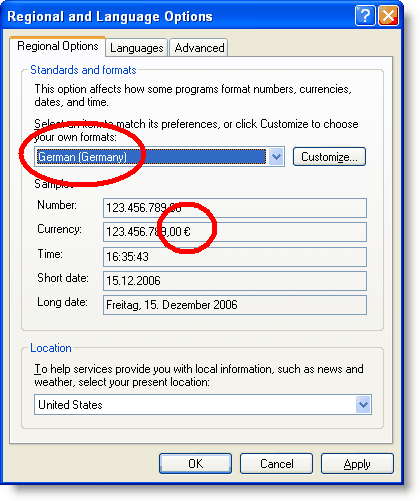
The currency symbol displayed with the gifts will be the one associated with the regional settings chosen in your Windows settings (this picture is a Microsoft Windows dialog box, not a TntMPD box). Sometimes people are confused because their Windows settings are in dollars or some other currency (by default), but they expect their TntMPD to display in the currency of their ministry.

Menu Path: Start | Control Panel | Regional and Language Options