TntMPD
Powerful software for ministry partner development...
Next Ask

Contents

Introduction
TntMPD Overview
TntMPD History
Shortcuts
TntMPD Views
Quick Reference Guides
Reference Guide: TntMPD Overview
Reference Guide: Managing Contacts
Reference Guide: The MPD Tab
Reference Guide: Tasks & History
Reference Guide: Using Lookups
Reference Guide: Using Appeals
Reference Guide: Using Mail Merge
Reference Guide: Import Contacts
Reference Guide: Using Groups
Getting Started
About Printing
Installing TntMPD
Login/Password Error
Tutorial: Creating a new TntMPD database
Setting TntMPD Options
Tutorial: Set Your TntMPD Options
General Tab
Gifts Tab
Regions Tab
International Tab
User Interface Tab
Installation Tab
Managing Contacts Overview
Tutorial: Contact View Overview
Tutorial: Adding/Editing a Contact
Matching Contacts
Exporting Contact Information
Summary Data
Address Tab
Greetings
Phone Numbers
Email/Internet Addresses
MPD Tab
Tutorial: MPD Tab Overview
MPD Phase
Next Ask
Pledge
Region
Referred by
Likely to Give
Send Newsletter
Deceased Contacts
Direct Deposit
Magazine
Tasks/History Tabs (Contact View)
Groups Tab (Contact View)
Notes Tab
Personal Tab
Pictures Tab
User Tab
Other Contact/Group Menu Items
Add Referrals
View Organization Info
Address / Phone Out of Sync
Manually Add Donor IDs
Combining multiple accounts for one contact
View Details
Send Email to your Contact(s)
Deleting Contacts
Importing Contacts
Address Input from Web
Gifts & Appeals
Tutorial: Downloading Gifts from the Web
Giving History
Tutorial: Adding New Gifts
Gift Input Form (manual input)
Address and Gift Input from File
Dealing with Gifts
Editing Gifts
Deleting Gifts
Splitting Church/Foundation Gifts
Appeal Tracking
Tutorial: Creating Appeals
Associate History with an Appeal
Tutorial: Log gifts from an Appeal
Review Appeal results
View Giving Trends Report
Lookups Overview
Tutorial: Create a Basic Lookup
Lookup Dialog Box
Successive Lookups
Lookups Sort Order
Lookup Menu Items
Lookup Favorites
Default Lookup
MPD Lookups
Groups / Saved Groups
Current vs. Saved Groups
Tutorial: Setting up a new Saved Group
Current Group
Tutorial: Change a Field (for all Contacts in the Current Group)
Tutorial: Log History (for all Contacts in the Current Group)
View Giving History
Send Group Email
Tasks & History
Task Types
Tutorial: Schedule a Task
Tutorial: Log History
Automatic Action for New Gifts
Clearing or Exporting Tasks
Writing Meaningful Descriptions
Saved Descriptions
MPD Phase Auto-change
Analysis & Tools
Analysis View
Support Progress Box
Contacts & Referral Pool
Weekly Activities
Charts
Pledge Fulfillment Report
Contribution Report
Birthday & Anniversary Report
All Pictures
Other TntMPD Tools
Schedule View
Sync with Outlook
Mail Merge
Tutorial: Mail Merge
Tutorial: Mail Merge-Labels
Tutorial: Email Merge
Mail Merge Favorites
Practical Merge Tips
TntSync
Tutorial: Synchronize two TntMPD Databases
Tutorial: Synchronizing Files & Folders
Backups
Copying your Database
File Maintenance
Compact & Repair Database
Check for Updates on the Web
Exporting from TntMPD
Link with Microsoft Access
Getting Help
Community View
Error Reporting
View System Info
Help | About
Pick Lists
TntMPD Pro
All TntMPD Tips

Syndication

Next Ask

Print this Topic Previous pageReturn to chapter overviewNext page

The Next Ask box is for assigning a future ask date to a contact. If you move your cursor over the words Next Ask, you will see the letters change color and the cursor becomes a hand.
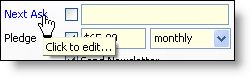
Click once and a calendar will appear, enabling you to select a date, and even a time. Doing so allows you to utilize your “Next Ask” lookup. However, it does not put an ask/call in your task list or schedule. (This is a handy feature if you are making a lot of calls and continually refreshing your Call for Appts lookup.)

Other options on the Next Ask screen include the ability to check on or off a specific time. For example, if you are scheduling an ask for 6 months from now, it may not need to be done at exactly 2:01:25 pm.

You can also select Never ask for a contact, either from here or from the MPD Tab. An example of this may be a monthly partner who has indicated they do not want to be asked for special gifts. Or it may be a person who gets your letter but does not want to give financially. If you check the Never box here, the calendar will disappear; the Never Ask box will also be checked on the MPD Tab.