TntMPD ®
Powerful software for ministry partner development...

How do I link a donation account which was accidentally linked to the wrong contact?

It is our pleasure to provide this software free of charge to help you in your ministry.  We're so thankful for our partners who make this possible!

About TntWare

Table of Contents

Page Details

First published by:
Troy Wolbrink
on 29 Sep 2008
Last revision by:
Troy Wolbrink
on 29 Sep 2008
7 people found this article useful.

100% of people found this useful
How do I link a donation account which was accidentally linked to the wrong contact?

How to link a partner's donation account to a different contact in TntMPD

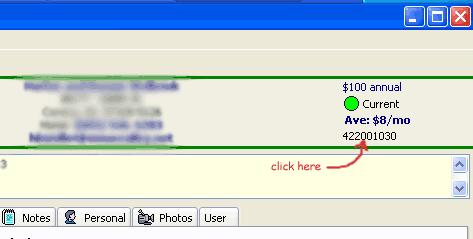
1.  Go to the contact which is linked to the wrong account number.  You may either click on the account number in the top-right part of the screen, or under the "Contact" menu, click on "View Org Details".
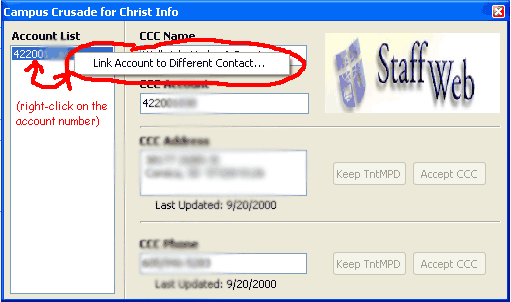
2.  Right-click on the account number in the account list to the left and click on "Link to a Different Contact...".
3.  Choose the contact that this account should be linked with.  (If the contact does not exist in your database, click on the "Contact" menu, then click on "New Contact".  Then go back and link the account to this new contact.)

Recent Comments

By: Chris Randazzo Posted on 4 Dec 2010 10:08 AM

Thank you - this is EXACTLY the information I needed to fix the error I created in linking a donation to the wrong contact.  I knew there had to be a way to do this, and couldn't figure it out myself.  The FORUM help did the trick!

By: JoshuaDean Posted on 6 Jul 2011 6:39 PM

How do you right click in TNT with a Mac?  Normally with a mac, you crtl-click.  But that doesn't seem to be working.

By: Troy Wolbrink Posted on 7 Jul 2011 12:32 AM

@JoshuaDean, make sure you're on the latest version of TntMPD for the Mac.  It's available under the "Downloads" area of this website.