TntMPD ®
Powerful software for ministry partner development...

How do I get past, "The database can not be created on the C:\ drive unless it is saved to your "My Documents" or "Desktop" directory.*"?

It is our pleasure to provide this software free of charge to help you in your ministry.  We're so thankful for our partners who make this possible!

About TntWare

Table of Contents

Page Details

Published by:
Troy Wolbrink
on 2 Aug 2010
9 people found this article useful.

100% of people found this useful
How do I get past, "The database can not be created on the C:\ drive unless it is saved to your "My Documents" or "Desktop" directory.*"?

When prompted to create a new database, be sure to create it in your "My Documents" or "Desktop" directory.

To change the location to the Desktop directory, there's a button you can press:
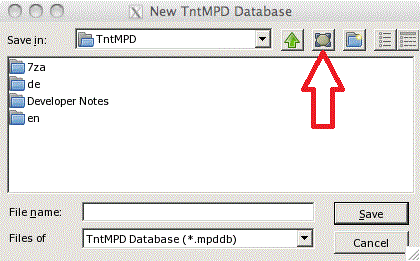
From there you can choose your "My Documents" folder also.

The Desktop location corresponds to the Desktop on your Mac.  The My Documents location refers to your home directory (/Users/yourname/) on your Mac.

Recent Comments

Leave the first comment for this page.