TntMPD
Powerful software for ministry partner development...

How can I run TntMPD on my Mac?

Table of Contents

Page Details

First published by:
Troy Wolbrink
on 29 Sep 2008
Last revision by:
Troy Wolbrink
on 3 Nov 2009
10 people found this article useful.

76% of people found this useful
How can I run TntMPD on my Mac?

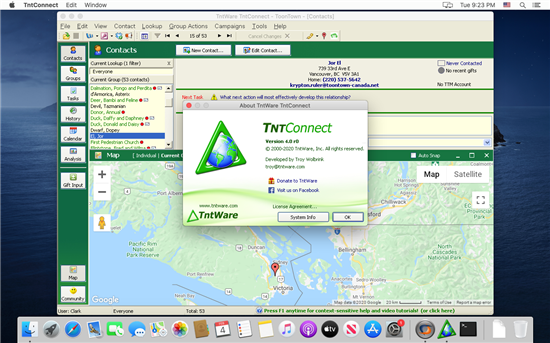
A better question might be "How can I run Windows on my Mac?".  TntMPD is built for Windows, and it requires Windows 2000 or newer.  The thought of developing a Mac-specific version of TntMPD has been considered, and there are some steps being taken internally to move TntMPD towards being more cross-platform friendly.  But the current reality is that it will probably be many years until anything is available.

Fortunately there are many good options for running Windows on your Mac now.  A few years ago Apple began using the Intel chip for Macs which is the same chip used by Windows computers.  This shift by Apple has made it much easier and faster to run Windows on your Mac.

The different options can be roughly broken down to 4 categories:

  1. Virtualization (Parallels, VMware, VirtualBox).
  2. Dual boot (Boot Camp).
  3. Emulation (Virtual PC).
  4. Other (CrossOver, WINE).

Virtualization (Parallels, VMware, VirtualBox)

These products allow you to simultaneously run Windows side by side with your Mac OS.  Because these products don't have to emulate the Intel CPU, they run Windows very fast at nearly full native speed.  Parallels and VMware even provide options to make the programs running in Windows to appear as if they are Mac programs, hiding much of the Windows interface.

Take note:

  1. This option requires a Mac with the Intel chip.
  2. You still need to purchase and install a full license of Windows.
  3. Windows XP Home or Windows Vista Home are more than sufficient for running TntMPD.
  4. Some work is being done (in the "labs") specific to the Parallels product that might help TntMPD better integrate with the Mac environment.
  5. Work has been done by our staff in Germany to make the Parallels experience even more integrated:
        TnT-Word-Mac Plug-in for Parallels (version 0.3)

Parallels  (Recommended by TntWare!)

VMware

VirtualBox


Dual Boot (Boot Camp)

Boot Camp allows you to install Windows on its own partition on your hard drive.  Unlike virtualization you can not run Windows side by side with your Mac OS.  Instead, you need to restart your computer into Windows mode.  Take note:

  1. This option requires a Mac with the Intel chip.
  2. You still need to purchase and install a full license of Windows. 
  3. Windows XP Home or Windows Vista Home are more than sufficient for running TntMPD.

Boot Camp


Emulation (Virtual PC)

On older Macintosh computers, you might be able to install Virtual PC.  Although Virtual PC will allow you to run TntMPD, many users have reported this to be a painfully slow experience.  This slowness is because older Macintosh computers are not based on the Intel CPU, this it must be emulated.

  1. You still need to purchase and install a full license of Windows. 
  2. Windows XP Home or Windows Vista Home are more than sufficient for running TntMPD.

Virtual PC


Other (Crossover, WINE)

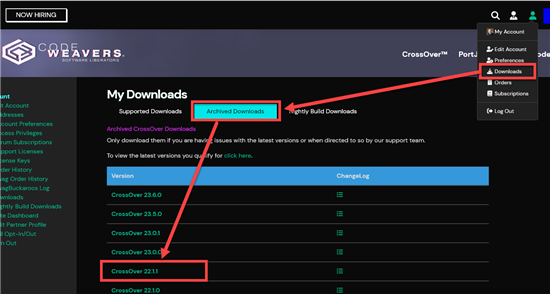
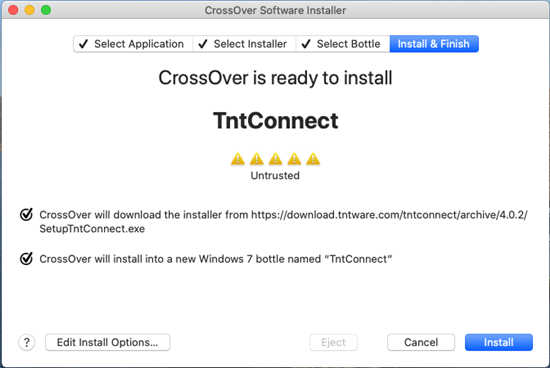
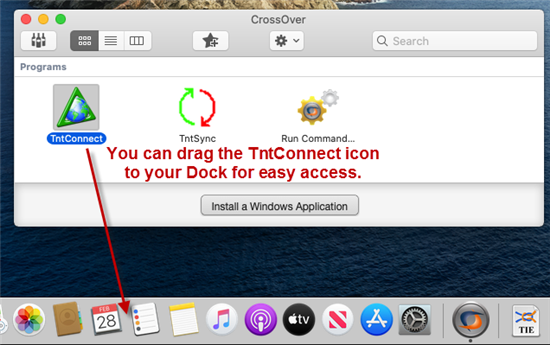
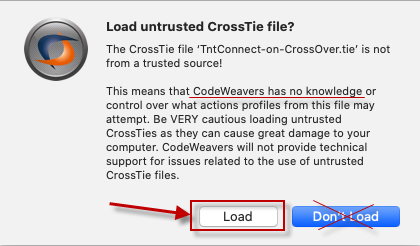
CrossOver is a commercial variant of WINE.  WINE is an open source project with the goal of cloning Windows functionality without requiring Windows.  A few have reported being able to successfully install and run TntMPD using these technologies.  But most of the feedback I have received has been that running TntMPD on these technologies is problematic.  If you are feeling brave and would like to experiment with these products by all means do so.  But be aware that TntWare does not officially support TntMPD running on CrossOver or WINE.  Various sets of Instructions on how to begin trying this are available:

Until CrossOver and WINE are officially supported by TntWare, please share your experiences or seek advice from others on this topic at TntMPD's "Beta Testers" group and not in the main forum.


Recent Comments

By: NickLarison Posted on 30 Apr 2009 11:34 AM

I'm having some truble. My mac is not new, it is a 15" Powerbook G4. Would you be able to reccomend for me a software to be able to run Windows? I have attempted to run several of them but no success. Would you be able to help...Thank you

By: Troy Wolbrink Posted on 4 May 2009 10:54 AM

Nick, I mention one possible solution above under "Emulation (Virtual PC)".  But I wouldn't recommend Virtual PC, because I've heard it's really slow.  You might consider buying a cheap "netbook" from Best Buy that runs Windows XP for around $250.

By: SarahFowler Posted on 14 Aug 2009 2:16 PM

I've tried Crossover. I was instructed to download older versions of tntmpd, none of which worked. Always received an error message.

By: David Posted on 8 Sep 2009 1:41 PM

Check this setup out:

andrewroth.ca/.../tntmpd_darwine

A great free option.

By: MikedeBeer Posted on 2 Oct 2009 12:35 AM

How do I install TntMPD on my Macbook?

By: Troy Wolbrink Posted on 2 Oct 2009 9:00 AM

Hi Mike,  I'd suggest Parallels or Virtual Box for the best experience.  Links to both products are in this article.   --Troy

By: dorigos Posted on 11 Oct 2009 11:00 AM

You can use Crossover, than download this version 2.0.39 ( I think this is the last version that mac can use) download.tntware.com/.../2.0.39

Than follow this instructions download.tntware.com/.../Running_TntMPD_on_CrossOver_Mac.htm

Hope this help.

Andrea

By: HenryTan Posted on 21 Dec 2009 12:09 PM

If you meet some access violation using wine, you can try to use the winecfg to switch to window 98 after successful installation. I've tried and no error prompt. Currently meet one problem is I cannot connect to gifts input. Wonder is it because of new crossover version or the tntmpd side. Hmm.

By: Troy Wolbrink Posted on 14 Jan 2010 9:50 AM

Please keep this comments area clear for commenting on ways to effectively use the *current* technology and tools.  Suggestions about improvements to TntMPD are more than welcome here:

www.tntware.com/.../suggestions.aspx

Thanks!