TntMPD ®
Powerful software for ministry partner development...
Link with Microsoft Access

Contents

Syndication

Archives

Link with Microsoft Access

Print this Topic Previous pageReturn to chapter overviewNext page

Warning: You can cause significant damage to your TntMPD database by manipulating it in Microsoft Access. Be sure to create a backup copy of your TntMPD database before attempting to work with it in Access. Because of this, this manual does not provide any instructions on modifying your data in Access.

You should only link to Access and open your database in Access if you are already familiar with using Access.

Linking database to Access

Your database does not have an automatic link to Access. You have to create it first.

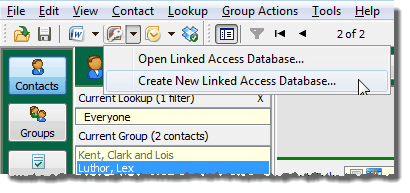
1.Menu Path: Tools | Microsoft Access | Link Access Database

2.On the "Set Access Database" box, press New to create (and save) the linked database.

3.After this, this Access database box will typically fill in the field automatically, or you can Browse for it.

You can then open Access and see your database.

Note: If you modify any data in Access, you should run maintenance steps to ensure the integrity of your data.

Menu Path: File | Maintenance

Read More > File Maintenance