TntMPD ®
Powerful software for ministry partner development...

TntMPD 2.1 r76 (beta) -- Sync with MailChimp

This latest beta adds a new feature to sync TntMPD with MailChimp.  To get this beta (on Windows or Mac),
under the "Help" menu, click on "Check for BETA Updates".

Under the "Tools" menu:  "Sync with MailChimp".  You'll see this:
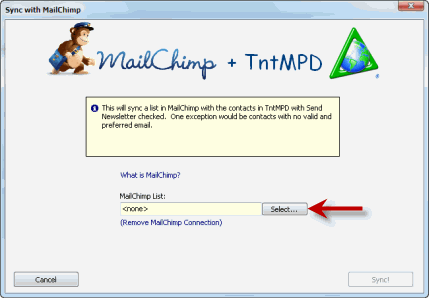
The first thing you should do is select a MailChimp list you want to sync with.  This feature will sync all the contacts in TntMPD who have the "Send Newsletter" box checked, and who haved a valid/preferred email address.

When you click "Select", you are first prompted to enter your MailChimp API Key:
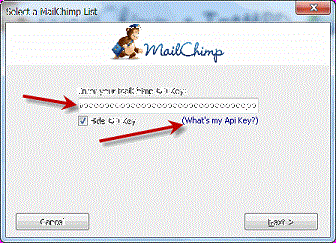
If you're not sure what it is, click on the "What's my Api Key?" link.  When you click it, you'll see something like this:
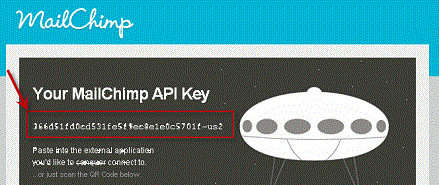
Copy and paste this into TntMPD and click "Next".

Then you must select an existing MailChimp list you want to sync with:
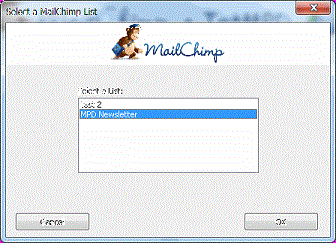
Click "OK", then click "Sync!".

This will now sync your list in TntMPD with all those in the MailChimp list.  Any unsubscribes in MailChimp will cause the email in TntMPD to no longer be "Preferred".  Any bounces in MailChimp will cause the email in TntMPD to no longer be "Valid".  EIther way a history will be logged.

If the email address changed in MailChimp since last time you synced, it will be updated in TntMPD automatically, with a history logged.

If the name changed in MailChimp since last time you synced, a task will be scheduled in TntMPD for you to investigate.

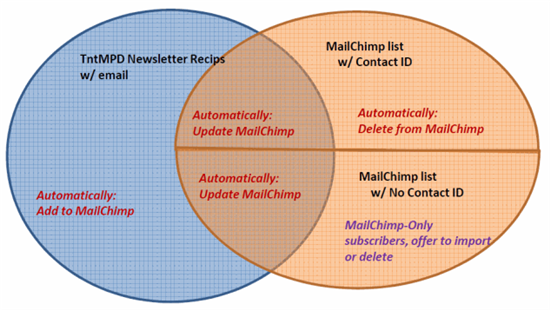
Next, all the contacts in TntMPD with the "Send Newsletter" check box checked will be added to MailChimp (assuming they have a valid/preferred email).  Also, it will update the list to reflect TntMPD's current state.  It adds some additional fields that can be used to filter the list in MailChimp or to merge.  It adds the "Greeting" field, which is nice for merging.  It also adds user fields, mpd phase, pledge amount/frequency, and a few others.

Any emails in MailChimp that were originally from TntMPD will be deleted if they are no longer associated with a contact in TntMPD with the "Send Newsletter" box checked.

To better visualize what's going on, consider these circles.  The blue circle is all the TntMPD contacts with "Send Newsletter" checked, and with a valid/preferred email.  The orange circle is the MailChimp list.  The overlap is where the email address is in common.  The top half of the MailChimp circle is emails that came from TntMPD from a previous sync session.  The red actions are done automatically.  The purple action is described next.
Finally, if ther are any emails in the MailChimp list that are exclusive to MailChimp, these are displayed now:
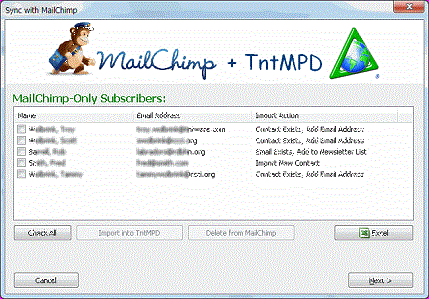
You can check the box for the items you wan to import.  This can either bring in a new contact, add an email address to an existing contact, or it can check the "Send Newsletter" box for a contact that matches the email address.  A history is logged for any import, so you can always check the History view to lookup the contacts just imported and make sure they look right.

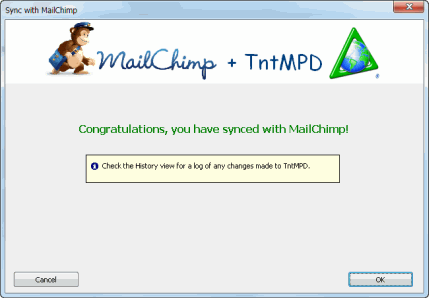
Click "Next" and you're done!
Here's what this last screen looks like on a Mac:

Posted 15 Nov 2011 4:29 PM by Troy Wolbrink

Comments

Bret Hern wrote re: TntMPD 2.1 r76 (beta) -- Sync with MailChimp
on 14 Nov 2011 11:47 PM

Troy -- posted an error I was getting over on the tech support forum, but will repeat a comment here -- if I'm reading the above correctly, the new feature is hardwired into the "Send Newsletters" flag on contacts.

Our setup is such that our *email* subscribers (to whom we send our newsletter via MailChimp) are not tagged with the "Send Newsletter" flag -- instead, we include them in a separate group. (We send mostly snail mail newsletters, and our activities in preparing those are made easier if we use the "Send Newsletter" flag only for them.)

Would it be possible to add a "Tnt-side" selection of a group to sync with the MailChimp list selection? The "Send Newsletters" option could remain the default, but it would be great to be able to choose one of our TntMPD groups iinstead.

Troy Wolbrink wrote re: TntMPD 2.1 r76 (beta) -- Sync with MailChimp
on 15 Nov 2011 12:39 AM

Hi Bret, Thanks for the early testing and feedback.  I'll address your error on the forums.

There is a solution coming in a month or two that is much more granular than the "Send Newsletter" group that is currently being used.  For now, the only workaround I can think of would be to do a Group Field Change on some user field, so that it corresponds to your group.  The user fields are exported, so you could filter on these when sending out a campaign.

Russ wrote re: TntMPD 2.1 r76 (beta) -- Sync with MailChimp
on 15 Nov 2011 7:32 AM

I can't seem to find Bret's post on the forum? Could you add a link?

Troy Wolbrink wrote re: TntMPD 2.1 r76 (beta) -- Sync with MailChimp
on 15 Nov 2011 8:28 AM

Here's his forum post:  www.tntware.com/.../6075.aspx

Brian Fowler wrote re: TntMPD 2.1 r76 (beta) -- Sync with MailChimp
on 18 Nov 2011 7:04 PM

When I tried to sync I got the following error: "the number of columns in the result does not equal to 22."  Not sure what to do, what do you suggest?

Troy Wolbrink wrote re: TntMPD 2.1 r76 (beta) -- Sync with MailChimp
on 29 Nov 2011 11:01 AM

Brian, you should report this on the forums with all the error details.

Brian Fowler wrote re: TntMPD 2.1 r76 (beta) -- Sync with MailChimp
on 30 Nov 2011 9:26 AM

I just posted it by clicking on the "Report Error" button from tnt.  You should see all the error details on the forum now.

Peter Bowers wrote re: TntMPD 2.1 r76 (beta) -- Sync with MailChimp
on 16 Dec 2011 4:23 PM

I have always had separate lists for my hardcopy newsletter and for my email newsletter.  TNTMPD had held my hardcopy newsletter, but sometimes I may have put an email address for someone in or something.  I'm a little concerned what may happen if I sync the 2.  Is there any way to do a "trial" sync that would just report the actions without actually doing anything?

Troy Wolbrink wrote re: TntMPD 2.1 r76 (beta) -- Sync with MailChimp
on 7 Mar 2012 9:02 PM

Hi Peter,  There's no "trial" sync.  But if you have subscribers that are in MailChiimp only, nothing automatic will be done with them.  After syncing all the other emails, it will show you the MailChimp-only subscribers and give you the option to either import them into TntMPD or delete them from MailChimp.  By default nothing will be done, so you have to go out of your way to make either choice happen.  --Troy

Stevie K wrote re: TntMPD 2.1 r76 (beta) -- Sync with MailChimp
on 3 Apr 2012 5:05 PM

So, on many of my contacts I have emails for both spouses and have made them both preferred for quick access. I want to sync both to Mailchimp so they both get an email. Does it do this?

Troy Wolbrink wrote re: TntMPD 2.1 r76 (beta) -- Sync with MailChimp
on 4 May 2012 2:21 AM

@Stevie, TntMPD will sync any email that is "Preferred" if the "Send Newsletter" box is also checked.