This is probably because your privacy settings are too aggressive in Internet Explorer.
Try this:
1. Under the “Tools” menu in Internet Explorer, click on “Internet Options”.
2. Under the “Privacy” tab, click on “Default” (if it’s not grayed out).
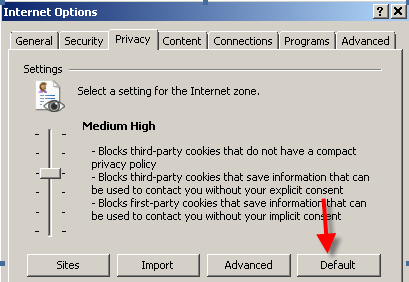
Click “OK”, then close Internet Explorer.
Try logging in again.
If the problem happens again, then try this:
under the “Start Menu”, click on “Programs”, “Accessories”, “System Tools”, then “Internet Explorer (No Add-ons)”.
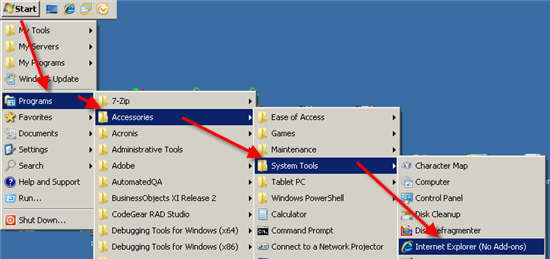
Try logging in to this website again.
If TntMPD still asks you to Verify your OpenID, enter this as the OpenID and click the button:
https://www.tntware.com/gcxopenid
If you still don’t get any further, I’d suggest you try Firefox (a different web browser than IE):
http://www.mozilla.com/en-US/firefox/ie.html